The following sections detail construction projects for a
'70's-era HP 21MX-series minicomputer as a suppliment to the HP-IPL/OS
pages. Originally these computers used paper-tape for
software input and output, supplimented by big clunky disk drives
with packs of platters. These days HP 21xx software is generally
in the form of "ABS" (absolute binary system) files on a PC, and
likely the first thing someone who has aquired one of these
machines needs is a paper-tape emulator to transfer PC files to
the HP. To run original HP operating systems one would need a
working period drive, not to mention the original software, but
more often than not the HP hacker only has the CPU cabinet and
little else. HP-IPL/OS was written to permit these old computers
to be operated and programmed in configurations ranging from a 8KW
2114 with only papertape to a 192KW MX system with disk, HPIB,
BACI (serial) and other devices, including an XY display generator
which can write words and graphics to a standard oscilloscope.
HP-IPL/OS supports actual 7900 and 7906 disk drives but also
supports a homebrew "IDE" command set which can be used to make a
functional disk drive using modern components. Although no vintage
operating system can recognize such a drive (at least without
writing a custom driver), to HP-IPL/OS a binary is just a memory
image and it has no trouble loading most stand-alone vintage
software from disk that otherwise would have to be loaded from
papertape.
If you find yourself in the possession of just a HP21xx CPU you
might want to be able to do something with it besides turning it
on and listening to the fans, toggling in programs using the front
panel switches might get old pretty quick... so the first thing to
do is make a paper tape emulator so that software can be loaded
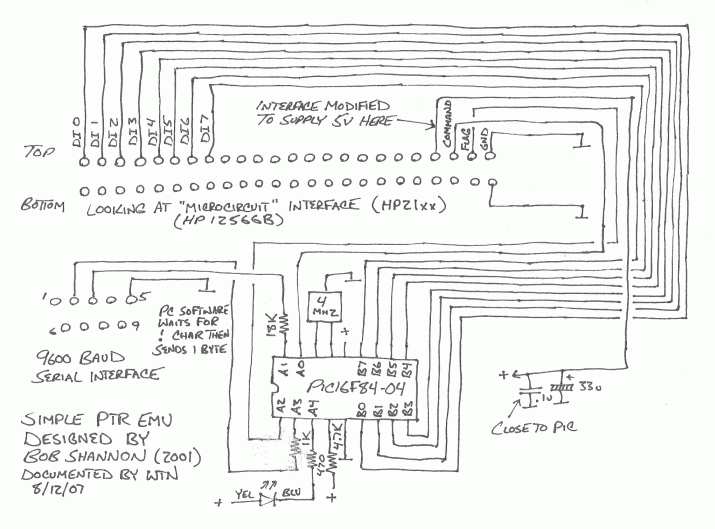
from a PC. The following design is a "pass-through" paper-tape
reader emulator, it permits transmitting a paper-tape file to the
HP mini over a serial port. It takes several minutes to boot
HP-IPL/OS but that's far better than nothing, and should be easy
to duplicate.
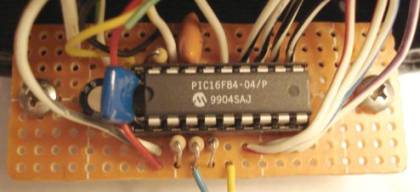
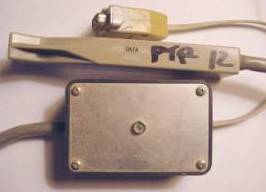
The PIC is programmed with code that transmits a "!" character to
the PC, then waits to get one byte which it passes to the HP. The
code was written by Bob Shannon (probably in PicBasic), source has
been lost but here's a hex dump and
a disassembly. I use a program I
wrote in QBasic called HPSEND to send
the file to load. This is a "dos" program and will not work under
Windows because that OS prevents the user from using the serial
port. It can be run using a dos boot disk, I run it using FreeDos
under DosEmu under Linux, which permits good old fashioned serial
port access after editing config files. For loading HP files from
Windows I found an older version of HpLoader
which appears to work under XP, requires the VB6 run-time files.
Operating procedure is fire up the HP21-MX mini, start the HPSEND
program and tell it what ABS file to send, select the S register
and set bits 6-11 to the PTR slot (others clear), press Store,
Preset, IBL, Preset, Run - HPSEND should respond by printing a "*"
(I had to fool with mode commands to get it to work, details in
the hpsend.zip file). Let the file load, when done the LED's for
bits 0-5 will light up. Unless a terminal is already connected,
close HPSEND, swap the serial cable to the HP's console port and
run ProComm or similar set for 2400 baud even parity 7 bits 1 stop
bit (on mine anyway, YMMV) Select the P register, press Clear,
light up bit 1 (run address = 2, adjust if run address is not 2),
press Store, Preset, Run.
The PTR emulator can also be used to load data files but things
get a bit tricky if only one serial port, under HP-IPL/OS to load
IPL files I have to use a HLT "word" (a program in the
"dictionary" of words in memory) containing a halt instruction and
include it on the LOAD line to give me a chance to swap cables.
Other things like HP BASIC provide no chance to swap so if
possible it's best to use separate ports for the PTR emulator and
console so everything can remain wired.
11/15/10 - I discovered that my microcircuit board is jumpered so
that while the data lines are ground-true, the command and flag
lines are ground-false. The PIC code assumes this. In other words,
to work with this particular board, the PIC code has to invert the
data bytes, but responds to positive-going command signals, and
asserts a positive-going flag signal once it sets the data lines.
The HP-IPL/OS "Simple File System" (SFS) permits storing up to 64
files in each of up to 64 volumes on each disk drive. Each file
can be up to just shy of 64 Kbytes, and files are allocated 64 KB
regardless of size (makes allocation a matter of simply finding
the first unused file slot). The files can be specific to
HP-IPL/OS or not, binary files are simply loaded into memory and
run without regard to content so can be almost anything that'll
fit in 31KW and run from a cold start. The top 1KW is reserved for
software to swap HP-IPL/OS back into memory, the current system is
copied to alternate memory before running binaries. To run
overlays requires storing the actual ABS file as a disk file then
using SFS file access functions to load it into alternate memory
on top of whatever is already there.
The SFS spec is independent of the actual drive, which is treated
simply as an array of 1KW blocks. A really nice aspect of this
design is a disk image for one drive can be used on another drive
provided the disk driver is swapped. HP-IPL/OS comes with drivers
for "real" 7900 and 7906 drives (but to my knowledge have only
been tested under simulation), and Bob Shannon's IDE disk
interface which permits connecting a common IDE hard drive using
an 8052-based
"Paul" board and some glue logic and code. Bob's system had
been running fine for years with old code but after updating
HP-IPL/OS and finding the IDE builds didn't work anymore (ended up
being something stupid) I decided I had to make my own IDE
controller so I could actually test the stuff. Besides it's fun,
and beats waiting several minutes for my machine to boot from my
pass-through PTR emulator.
HP interface boards come in many flavors, I'm certainly no expert
on the subject but from what I've been able to determine the ones
suitable for making a disk controller like this are either
TTL-compatible "microcircuit" interfaces (such as the one being
used for the pass-through PTR emulator which can be hooked
directly to the PIC pins), or based on 12V logic such as the "+16
BIT DUP REG" board I'm using to test the IDE controller. This
board is current-based, a "1" is current flowing but not in the
usual sense, the inputs have a fairly stiff pullup (800 ohms or
so) to +8 volts, the outputs can sink current but have a weak
pullup (10K) to 12 volts. Voltage on the lines is high for logic
"0" and low for logic "1" with the current flowing from the
input's pullup through the output's transistor. Essentially to
interface to these boards the logic levels have to be reversed and
the voltages dealt with. For connecting HP outputs to device
inputs, a series safety resistor, a diode to +5V, a resistor to
ground and an inverter will convert the signal to a normal 0-5V
logic level. For device outputs a resistor to the base of a
transistor with the emitter grounded and the collector connected
to the HP input will provide the necessary current sinking
provided the signal is fairly strong (say from a TTL or CMOS
chip), for weaker signals like those coming from an 8052 port an
extra emitter follower or a very high HFE single transistor is
needed, in addition to an external pullup resistor (8052 P1 pins
can source hardly no current, in the low uA range). To be useful
for a disk controller the interface needs to have 16 output lines,
16 input lines, plus the command and flag lines used for
handshaking, and be set to "transparent" mode for no input
register.
For the "+16 BIT DUP REG" board the jumpers should be set as
follows...
W1 to +12, W2 to -12, W3 to -2
W4 to B, W5 to B, W6 to B, W7 to A
W13 to A, W14 to A, W9, W10, W11, W12 out.
Here's a schematic of my version of the IDE interface...
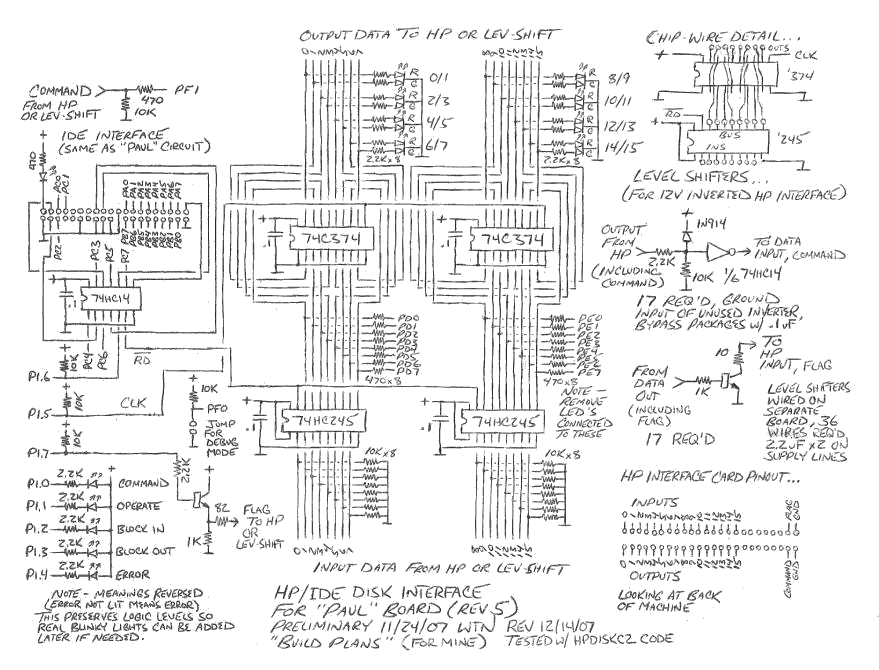
The entire circuit has been tested and seems to work [with a 12V
interface board]. Here are some notes
about the schematic.
Update 11/15/10 - The circuit is NOT compatible with a 5V
"microcircuit" interface, do not connect directly to the HP
without level shifter circuits or other interface elements - the
microcircuit outputs have 1K pullups and the inputs have 316 ohm
(!) pullups, which means the adapter circuit has to sink lots of
current, and minimum there must be resistors in series with chip
inputs to avoid large amounts of backcurrent through the protect
diodes if the HP is on when the adapter is off. The circuit
"should" also work with a ground-true microcircuit interface with
the level shifters shown on the schematic - jumper the interface
so that the command and flag signals are also ground-true (not
tested). Also note that the microcircuit connector pinout is
different. This circuit and the supplied code is only known to
work with my particular "+16B DUP REG" ground-true board with
ground-true control signals - but there is no guarantee it'll all
work perfectly as-is as different boards often have different
characteristics (as I discovered!), part of the HP minicomputer
hobby is figuring out what the characteristics are and if
necessary hacking the hardware and code into submission.
Note - when using the level shifters shown, a 150 ohm 1/2W
resistor should be connected between +5V and ground to bleed off
supply leakage from the HP. This is especially necessary if
connecting other devices that don't reset properly on power-up if
there's too much supply voltage when the interface is supposed to
be off. Might need lower, perhaps even 82 ohms.
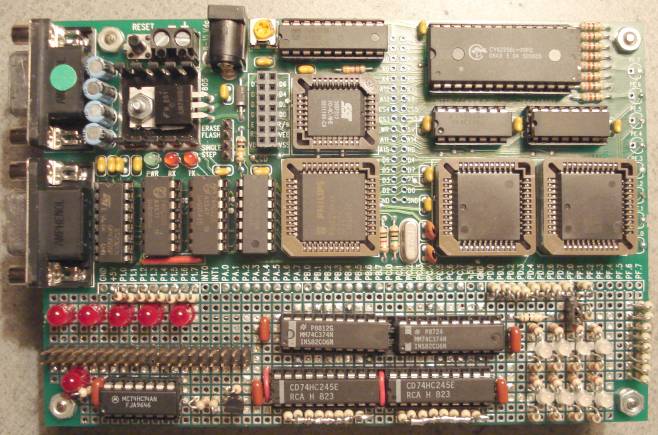
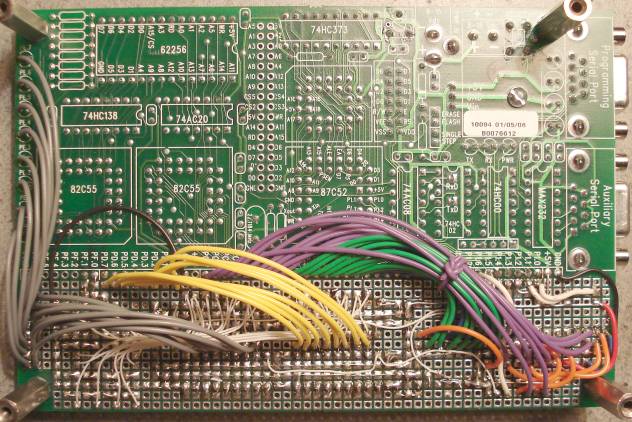
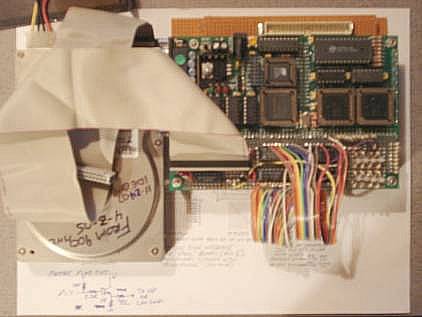
Here's the modified "Paul" board with the IDE interface and
TTL-compatible HP interface...
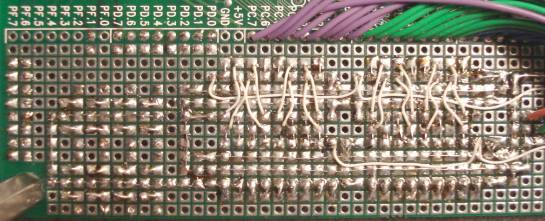
A detail of the wiring between the 374's and 245's before other
wiring applied...
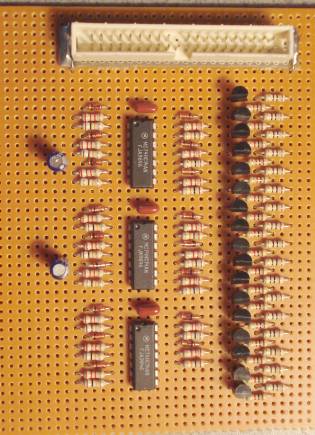
The level-shifter board... (the top connector goes to the HP "+16
BIT DUP REG" board)
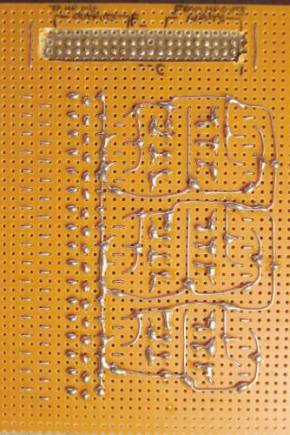
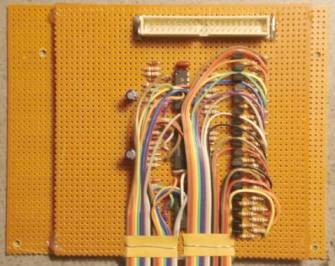
Point-to-point wiring was used to connect the level shifter outs
and ins to the HP connector, the board was positioned on another
piece of perfboard with hot-glue, set to raise the board up enough
to keep from compressing the wiring. Salvaged ribbon cables
connect the level shift board to the controller board...
Update 10/4/08 - I connected a VDRIVE2 USB "thumbdrive" interface
to my IDE controller to enable saving and restoring up to a
7906-platter's worth of data in SimH HP2100 format, details on the
IDE/USB page which includes updated
source code. Connection is simple, just hook up the wires. A piece
of empty perfboard on the left side of the level-shifter board
(above) was cut away to permit mounting the module underneath the
serial ports. Previously I was using a USB drive tray to
load/extract disk data, the thumbdrive method is much slower but
is more convenient, avoids wear and tear on the cables, and maybe
now I can put this thing into a box with its own power supply
instead of being spread out on my desk.
Update 6/5/10 - previous HP-IPL/OS version 1.53 is getting a bit
outdated, for the most part it's ok but a few semi-obscure
packages (print, edit, [hp]screen) have been updated with
better/fixed versions, and the docs aren't exactly great. Working
on a new archive that includes the latest packages and better docs
and fixes some usage issues (like potentially crashing if too much
stuff is loaded instead of saying it can't do that). Still waiting
for the testing archive to stabilize before calling it official,
but if trying out this stuff it's probably better to use than the
old version.
The new VDOS stuff presents the possibility of a making a simpler
VDRIVE2 interface that doesn't require the IDE stuff but can still
load and save files on a thumbdrive, probably enough for poking
around with an old minicomputer without the complexity of a
full-blown disk system. Provided the interface firmware presents
the same API (documented in the testing archive), the existing
VDOS packages should work as-is. Probably should also double as a
PTR emulator, without having to cram an IDE interface through the
same lines, could arrange so simple reads (without high bits set)
return the next byte of a open read file, and if a boot file is
present on powerup, transfer it using the standard "IBL" boot
procedure. Sounds like a "Microchannel" board and a PIC with
enough ram to provide reasonably-sized read and write buffers, 1KB
each should be fine. Perhaps a PIC18F2525-I/SP programmed using
Great Cow Basic?
Update 9/20/10 - working on a new standalone VDRIVE2 dos suitable
for small HP machines like the HP2114, menu-driven with options
for saving a binary file, attaching a file that can be read from
PTR (or booted), and a dos prompt. The current version is less
than 0.5KW. Not much time to refine at the moment, what I have is
in the udos.zip package. Includes updated
firmware that adds a new command (132000) that engages papertape
reader mode for the currently open stream read file, all bytes
have to be read or the interface reset to return to command mode.
Update 11/11/10 - The PIC-based HP USB
disk adapter is reasonably done, seems to work fine.
Theoretically it should work with both 12V and 5V HP I/O interface
cards but so far I've only tested it with the 12V "+16B DUP REG" I
use for my 8052 IDE/USB adapter and haven't tried the papertape
punch emulator feature yet. Works with both VDOS and UDOS, and
also functions as a stand-alone papertape emulator with switches
and a LCD for selecting single-letter read and write files, or a
serial terminal to specify full filenames. Some aspects are still
a bit experimental, the papertape command is implemented a bit
differently than the modified 8052 code - instead of switching to
papertape reader mode until reset or end of file, it disengages
papertape mode if another disk command is received, avoiding
having to reset the adapter and lose file attachments. Seems to
work.
Update 3/6/21 - No significant changes to any of these projects
(they are kinda frozen in time..) but updated the HP-IPL/OS
testing archive and the 7906 disk simulation after discovering a
bug in the 7906 disk driver.. the bit of code in the LDFB (load
from block) word that started the DMA transfer had a typo that
just happened to work on the old version of the hp2100 simulator
but failed on newer simulator versions, and most likely on the
real thing too.. fixed that and updated the simulation scripts to
be compatible with the latest version of the SimH hp2100
simulator, added a few more BASIC programs to the 7906 simulation.
Update 1/6/23 - Minor changes to the HP-IPL/OS testing archive -
added 3bugs.ipl and a new hposgames.abs build, tweaked the hp2100
simulator scripts to change attach ptp to attach -N ptp to
recreate files instead of appending.
Update 6/8/23 - Added ABS Files collection (absfiles.zip),
includes programs from absgames.zip and hpbapps.zip, HP-IPL/OS
games build, plus a few more treks I found and converted to
papertape HPBASIC. Each program has its own simh .sim file for
running (requires the simh hp2100 program), for Linux systems run
"a.sh" in a terminal for a menu. Also includes my latest docs for
papertape HPBASIC (added docs for matrix math and error codes) and
source code for everything. This is what I use on my Android phone
using Termux, for some odd reason I like running and reading
through antique code when I'm bored.
Update 4/7/24 - extracted the BASIC sources of games from the ABS
files collection that work with stock papertape BASIC, mainly so I
can use them with the awesome SimH cpanel HP2100 simulator I
recently discovered but also to keep the latest sources together.
While at it found a mistake I made when converting the (BYTE '77)
TREK program, fixed the corresponding ABS program in the
absfiles.zip collection.
HP21xx Minicomputer Software
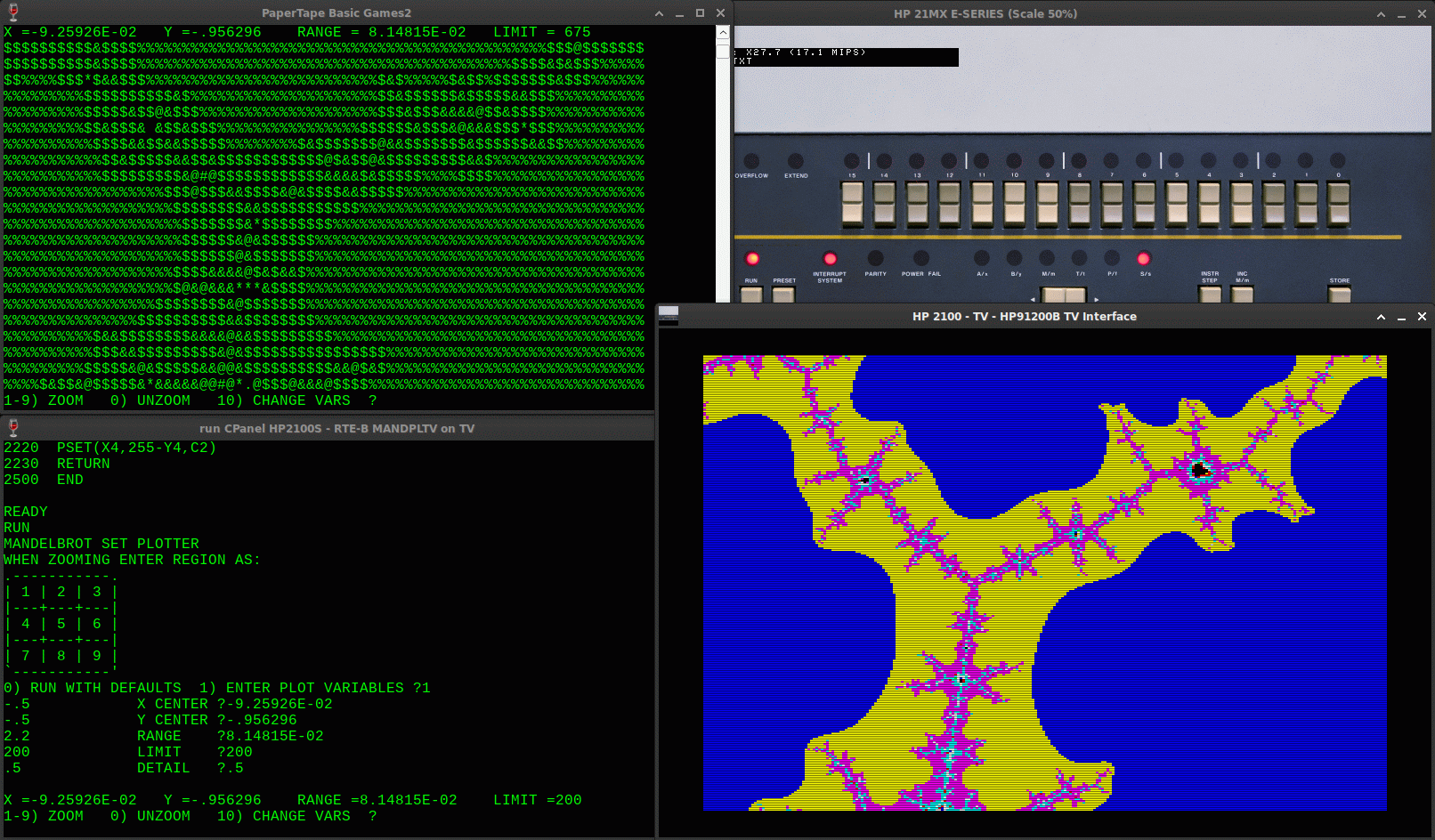
Here's TREK running on the "cpanel"
version of the SimH HP2100 simulator (HP2116C selected)...
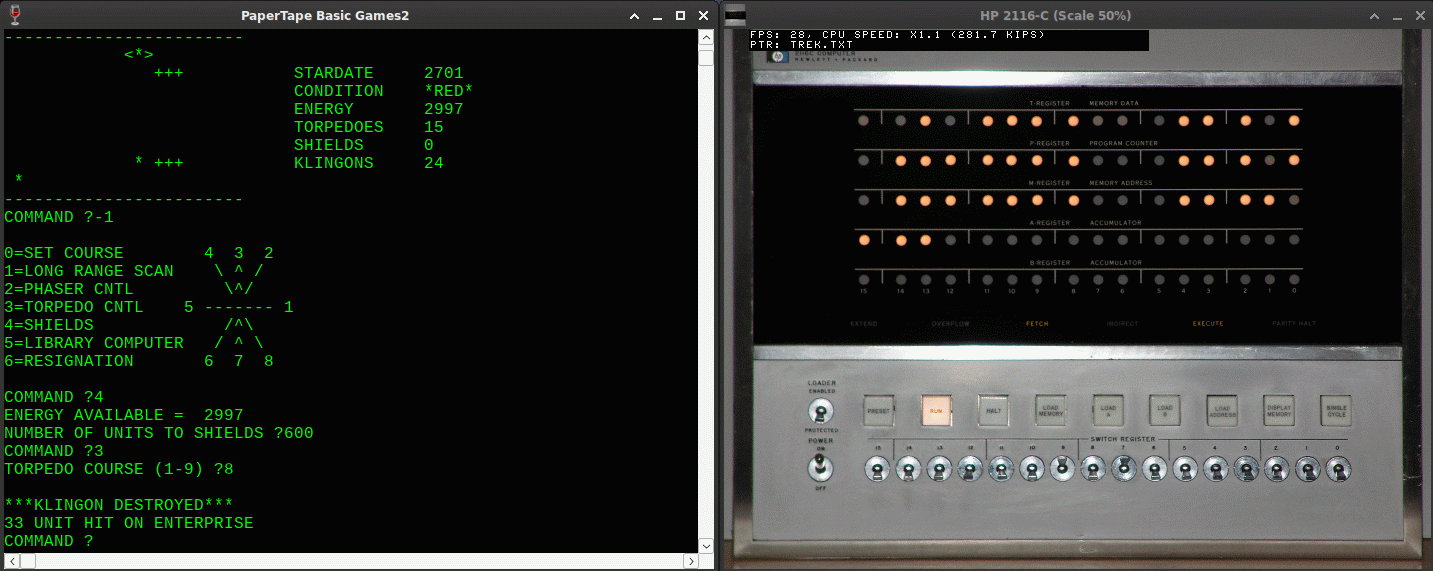
...the lights flicker while running and the switches work! It's
compiled for Windows but works well on my Ubuntu system using
wine. I've just begun to explore this HP21xx distribution,
includes many operating systems and has graphical devices for the
plotter, TV and X/Y interfaces. Also something I haven't heard of,
RTE-B (BASIC) with the TV interface, made some minor changes to
my MANDPL1 program and got this... the top console shows the
output from the original, the TV interface window shows what's
really there.
Other (much older) notes...
IDE disk notes... the 8052 code is configured to not autorun, in
a production system the marked values need to be changed so the
code starts automatically. If the drive is separately powered the
8052 needs to be powered up first, then the drive. The code will
lock until the drive becomes ready. The stock Paul Rev5 board
waits for a CR from the terminal to set the baud rate, to solve
this problem the "fix_baud.asm" code from www.pjrc.com can be used to set
the baud rate to a standard rate, updated examples are the
"autostart.asm" code. I set baud_const to 244 for 9600 baud, and
changed locat to 0xF000.
VDOS/USB disk notes... this project is (probably) easier to
replicate and is especially handy for running HP21xx software with
or without HP-IPL/OS as it has papertape reader and punch
emulation. When using with HP-IPL/OS, VDOS can be used to specify
filenames and even run the old EXTASMB assembler, ALGOL and
FORTRAN compilers, and the BCS linker to produce ABS files. A bit
funny with the enter key as the drivers require CRLF line ends,
but after awhile I just got used to hitting control-M control-J
instead of enter - another future hack. All that stuff is now in
the HP-IPL/OS testing archive.
Files notes... there is some overlap in the various packages
around here, the HP-IPL/OS main testing archive now includes a
sampling of most of the software but slanted towards running from
HP-IPL/OS and minus extra stuff that can be recreated or is too
special-interest. Other various zips expand on specific types of
applications with prebuilt binaries and other stuff that would be
too much to add to the main archive, sometimes created by starting
with the core files from the main archive then adding the rest of
the related material. Or the other way around. The older 1.53 main
archive is pretty much legacy material that can be ignored.. the
primary page for it is almost full so new stuff mostly spills over
to here now.
Initial Results
As of 11/29/07 the gadget essentially works, I can boot a copy of
my simulated HP-IPL/OS disk system and can load and save files. My
"+16 BIT DUP REG" board doesn't have W9 to W14 and can't be
configured to operate in transparent input mode, resulting in a
failure of the disk status being returned from the drive. To work
around this problem I had to force the <IDE function (status
read) to always return zero, details for doing this are in the
hpiplos_ide.zip docs. This can probably be fixed in the 8052 code
just not quite sure how yet, and likely would be fixing something
that's not broken if used with the "proper" interface so any mods
need to be done very carefully (my first attempt resulted in it
not working at all, and the code does work as-is, at least on a
11mhz 8052 connected to the right interface board). Nevertheless
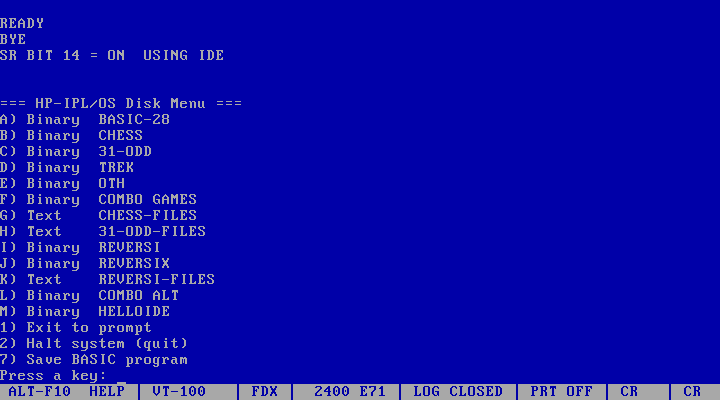
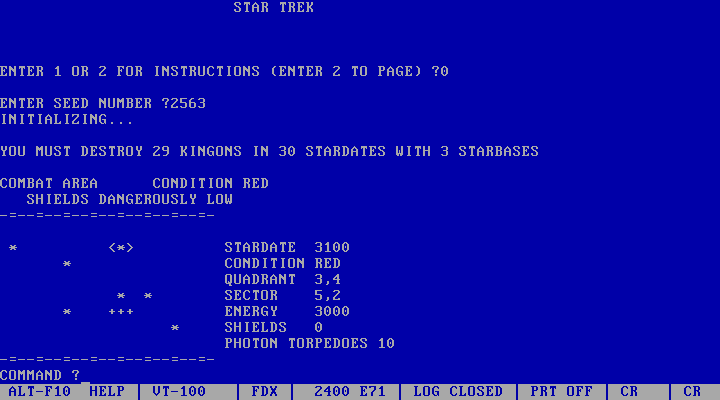
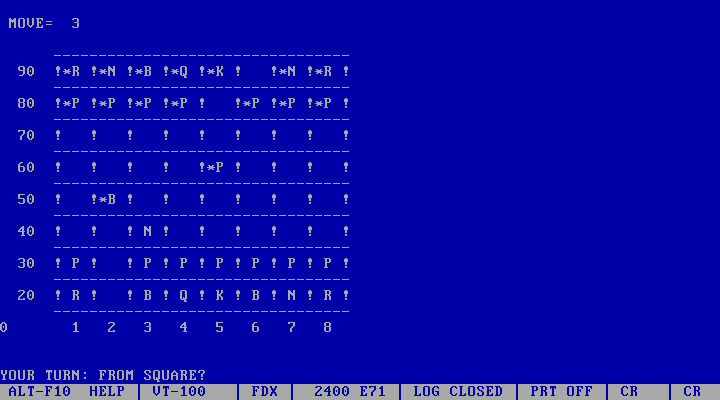
even partially broken I can now boot my HP2113 far faster than
from papertape, and have access to my favorite HP programs. Here
are a few screenshots of the system in operation...
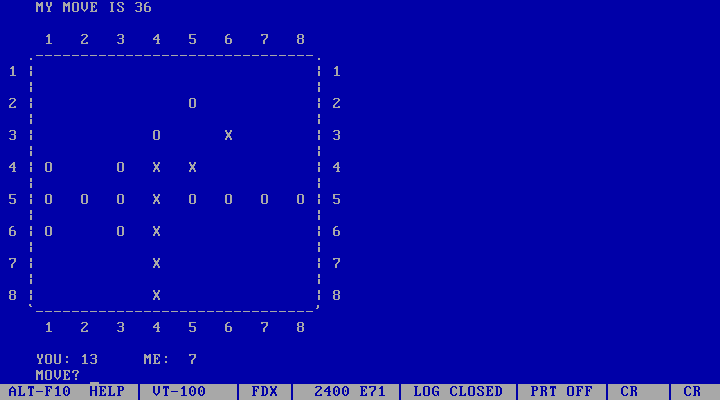
Going Further
The lack of jumpers W9 to W12 on the DUP REG interface board I
have prevents it from being able to run the "stock" 8052 disk
controller and HP-IPL/OS IDE code. Nevertheless a one-line command
was enough to get the system up and going so even if the status
read part is somewhat broken, the system as a whole certainly is
not - I can now boot my system far faster than it previously took
and it now takes only a couple seconds to load and run a program
from disk, instead of many minutes. Forcing the disk status read
to always return OK isn't as dangerous to the data as it might
seem, since if an actual error occurs the 8052 disk controller
code lights the error LED (or unlights it in the case of my
hardware) and becomes unresponsive to any command except to reset
the controller. The main difference is instead of getting an error
message then not being able to do anything, the system will likely
just hang, which is not necessarily a bad response to a disk
error.
The HP/IDE interface hardware as documented seems to work well
but there is still more that can be done to make it better...
Right now with the level shifters for 12V logic, if the HP mini
is off or the cable is unplugged, every bit is set which sends the
controller into an error state. The HP mini needs to be powered up
first to force all the outputs of it to logical 0, then the
8052/IDE controller can be powered. Adding pullup resistors to the
output-to-input level shifters would theoretically prevent
dependencies like that by forcing the default state to 0... each
output from the DUP REG board has a 10K resistor to 12V, 2.7K
pullups on the level shifter inputs to a +8V source sounds about
right, when the machine is off the input triggers will still see
roughly 4V, enough to register as high and output a 0 bit.
[note... debug mode still works fine with the HP turned off.]
Something should probably be devised for DUP REG boards that
can't be configured for transparent inputs (besides patching
HP-IPL/OS to be oblivious), preferably make the 8052 code so it
will work with either registered or non-registered inputs. The
<IDE status read has been a pain for awhile so one solution is
to add a real status read command to the IDE instruction set and
modify the HP-IPL/OS IDE driver accordingly [working on this but
in practice it has not been an issue - simply disabling status is
messy but works fine]. Another solution is figure out why status
reporting works correctly on a registered board after a disk read
but not after a write, telling me something is different between
the two paths and it probably can be made to work without major
code changes, and without changing the existing HP-IPL/OS builds.
These are sources and magtape binaries for a few RTE games...
Includes WOODY (chess), DAME (checkers), OTHEL, MMM, STAR and
TREK (the source for TREK is in hpgtapes.zip, hpgames.zip contains
the programs documented on my HP Games page).
Running these on real hardware would be difficult without an
existing HP1000 RTE system but now that SimH HP2100 supports
RTE-6/VM the magtape files in hpgtapes.zip can be loaded and run
under simulation. Some use HP terminal codes, the QCterm program
(v3.1a) permits running all of these except for DAME, that one
will have to wait until I apply HP->VT100 translations
to the SimH v3.8 HP2100 simulator program [available in source
form for 3.8-1] or some other support solution becomes available.
Created Nov 30 2007, last mod Apr 7 2024
Terry Newton (wtn90125@yahoo.com)